GuidedReel: an open-source script-to-video editor for web and desktop
What GuidedReel does, how one shared Remotion engine powers both a Next.js web app and an Electron desktop app, and the features that make short promo and social videos repeatable.
Padma Raj LamaPublished 4 min read
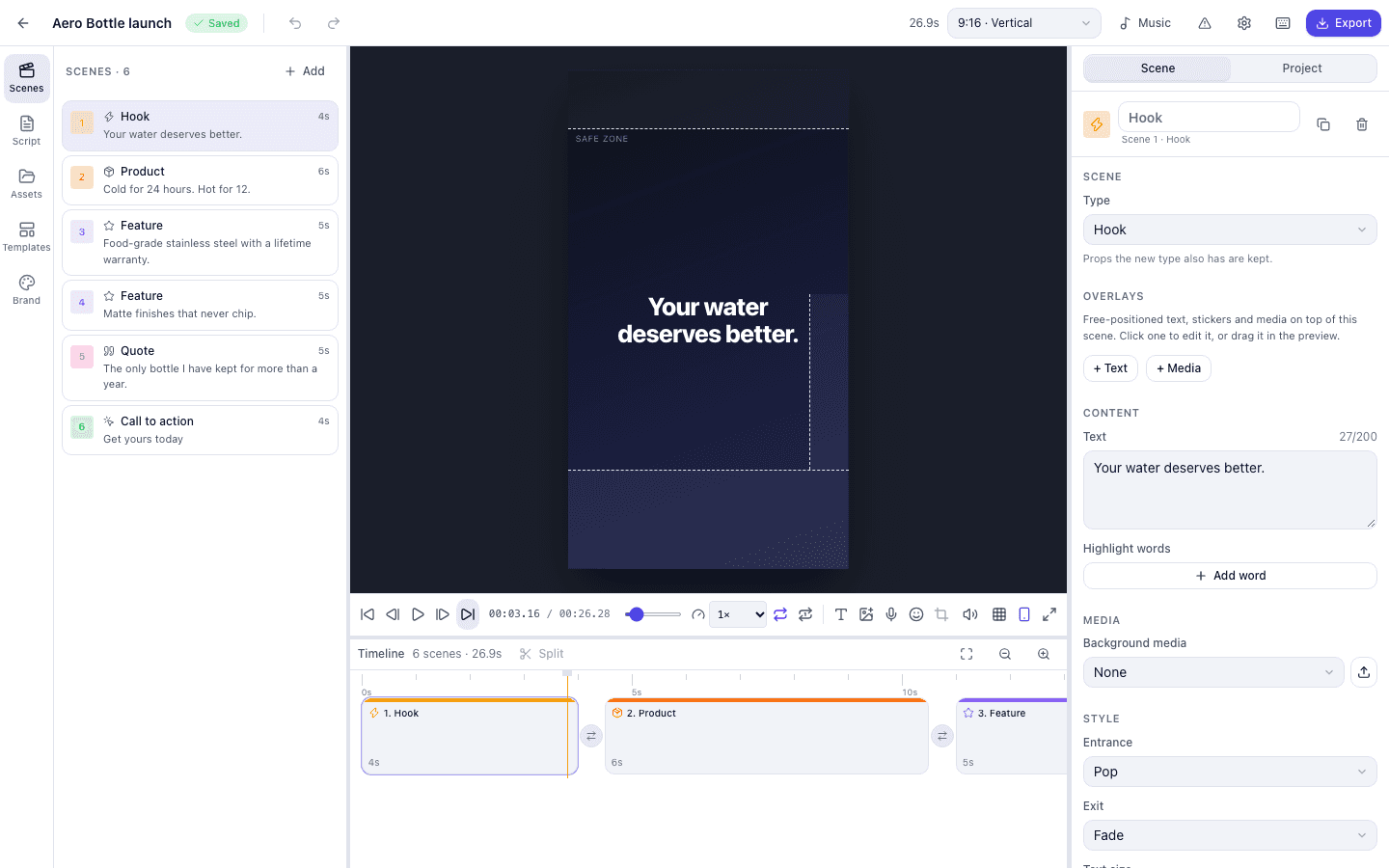
GuidedReel turns a script and a few assets into a finished video, in the browser or on your desktop. You write or paste a script, pick a format and a template, drop in images, clips, voiceover, and music, adjust the timing, and export an MP4. It's open source under the MIT license, and the first version deliberately uses no AI: every word and picture is yours.
At a glance#
- What it is: a script-first video editor for short promotional and social videos.
- Runs on: the web (Next.js 16) and the desktop (Electron, for macOS, Windows, and Linux).
- Built on: Remotion and a set of shared TypeScript packages published to npm.
- Status: beta (v0.2.0), MIT licensed.
Who it's for#
GuidedReel is for anyone who makes the same kind of short video again and again — product announcements, feature highlights, social reels — and wants a repeatable process instead of starting from a blank timeline each time. Because the engine is published as packages, it is also for developers who want to build their own video product without writing a renderer from scratch.
How it works#
A video is a plain project document that flows through a fixed pipeline:
Project → Scenes → Assets → Timeline → Template → Remotion Composition → Renderer → MP4The web app and the desktop app are thin shells. Everything that makes a video lives in shared packages, and the core packages depend on neither Next.js, Electron, nor any storage vendor:
schema— Zod schemas, format presets, scene definitions, and migrations.engine— timeline, durations, project factory, script import, and the music planner.templates— the template registry: Modern Promotional, Product Advertisement, Social Reel, and Blank.compositions— Remotion scenes, transitions, animations, and overlays.renderer— a renderer interface with a local Remotion implementation.storage— project and asset stores, with IndexedDB and in-memory implementations.ui— the shared React editor used by both apps.
Keeping the core free of framework and vendor dependencies is what lets the same editor run in a browser tab and in a desktop window, and what makes the packages reusable in other products.

Major features#
Formats and templates#
- Formats: 9:16, 16:9, 1:1, and 4:5 from one project — switch any time and scenes adapt.
- Templates that open with real sample content, so you edit instead of starting empty.
- Ten scene types: hook, intro, text, image, video, feature, product, quote, call to action, and outro — each responsive and brand-aware.
Editing#
- Script-first editing: one text block per scene; paste a plain script, JSON, or CSV and get scenes.
- Media that fits: automatic fit with a blurred backdrop, cover or contain, and a crop mode with zoom and pan.
- Overlays: draggable text, media cards, and over six hundred animated Noto emoji stickers with entrance, exit, and loop animations.
- Fourteen transitions and a catalogue of motion animations.
- Editor fundamentals: undo and redo, autosave, keyboard shortcuts, a problems list, a safe-zone overlay, and a live preview.
Audio and branding#
- Voiceover: record in the editor, use offline Piper voices on desktop, or OpenAI, ElevenLabs, or Google voices with your own key.
- Music: background music planned from the scene structure.
- Brand kit: colours, fonts (including Devanagari and CJK coverage), logo, watermark, and button style.
Export and portability#
- Export: H.264, H.265, VP9, or ProRes with quality presets, progress, and a render queue — local rendering on desktop, server rendering on the web.
- Portable projects: export and import
project.jsonbetween web and desktop, with a versioned schema and migrations.

Build your own video product on it#
Every package is published to npm under one shared version, and a scaffolder creates a web app, a desktop app, or both on top of @guidedreel/core:
pnpm create guidedreel my-studio
cd my-studio
pnpm dev:web
An explicit extension point, VideoContentGenerator, lets a future AI step produce the same project document the editor and renderer already understand, without changing either of them. AI becomes one more way to create a project, not a rewrite of the editor.
Running it#
Desktop installers are available for macOS, Windows, and Linux from the GitHub releases. The web app needs a long-running Node server for rendering — Vercel can host the UI, paired with Remotion Lambda for rendering. GuidedReel is in beta: the vertical slice works end to end on web and desktop, while cloud render workers, persistence and auth, captions, and AI script generation are designed for but not built yet.
GuidedReel is built on Remotion, which has its own license: free for individuals, non-profits, and small companies, with a company license for larger teams.
Frequently asked questions#
Is GuidedReel free?#
GuidedReel itself is open source under the MIT license. It is built on Remotion, which is free for individuals, non-profits, and small companies; larger companies need a Remotion company license.
Does GuidedReel use AI?#
Not in the first version. Optional text-to-speech providers can be used with your own API key, and the VideoContentGenerator extension point is ready for AI script generation later.
Can I move a project between the web and desktop apps?#
Yes. Projects export and import as a single project.json file with a versioned schema, and older files are migrated automatically.
Read the case study on the GuidedReel project page, or explore the code on GitHub.
Related case study: read how it was built
Related articles

Product Building5 min read
How Ajako Taja turns scattered news feeds into short, sourced stories
A look inside Ajako Taja's pipeline: hourly feed ingestion, grouping items that cover the same story, AI-written summaries grounded in the sources, and the human checkpoints along the way.

Product Building4 min read
Inside Recent Visits: travel guides, an AI trip planner, and honest recommendations
How Recent Visits combines a Nepal travel publication, an AI assistant grounded in published guides, and a partner marketplace whose rules keep sponsored tours from crowding out good matches.